
Serving Controls
Serving Controls are rules that control how shoppers see products:
- Boost certain products or categories higher in search results
- Bury others (such as products from a prior season) further down
- Filter out things that don't fit, such as hiding swimsuits in the winter
- Redirect shoppers to specific pages based on what they search for, so searches for "gift card" can simply be redirected to a gift card page
- Tweak the language of search results to make them more relevant to shoppers
Google Cloud's Retail API follows the configured serving rules.
Combine Serving Controls
Merchants can combine serving controls to create more tailored experiences. For example, a store may boost holiday sweaters and filter out non-holiday items for a seasonal collection.
Common Serving Controls
Hiding Out of Stock Products
Retail Cloud Connect intentionally imports out-of-stock products so AI models can keep using prior training data. Merchants usually hide out-of-stock products from storefront results to prevent frustration, streamline browsing, and reduce confusion.
To create this serving control:
-
Visit the Serving Controls settings in the Google Cloud Retail console
-
Click ➕ Create Control
-
Name the Serving Control, such as, Hide Out of Stock Products
-
Select Search as the Product and Filter controls as the Control Type
-
Click Continue
-
To apply this control on all search requests, select Search in the Triggers settings and click Continue
-
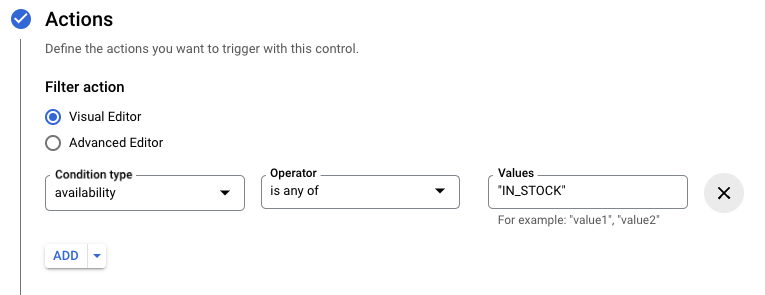
Under Filter Action, click Advanced Editor and paste the following text: availability: ANY("IN_STOCK")
-
Or, using the Visual Editor, set the Condition Type, Operator, and Values to match the following image:
-
Click Continue and then choose the Serving Config to apply the control to
-
Click Submit and the serving control should take effect immediately
Category Pages & Browse Results
A second Serving Control is required to hide products on browse pages.
Google Cloud Tutorial
In the video below, Piotr Kalachin from Google gives an overview of serving control types used for customizing search behavior to improve the shopper experience and shopper satisfaction.